- UID
- 5169113
- 性别
- 保密
- 注册时间
- 2018-5-28
- 威望
-
- 金币
-
- Z币
-
- 听众
|
本帖最后由 libAIzibubai 于 2018-10-30 09:38 编辑
调用百度语音API就可以让你的斐讯N1开口说话!
你需要:
1,一台刷了linux系统的斐讯N1()
2,一个百度语音合成API(官方文档)
3,一根HDMI音频分离器
4,一个小音箱
操作过程:
第一步当然是申请你的百度语音合成APItoken了
你需要在百度语音开放平台申请一个应用,并在详情页拿到如下参数
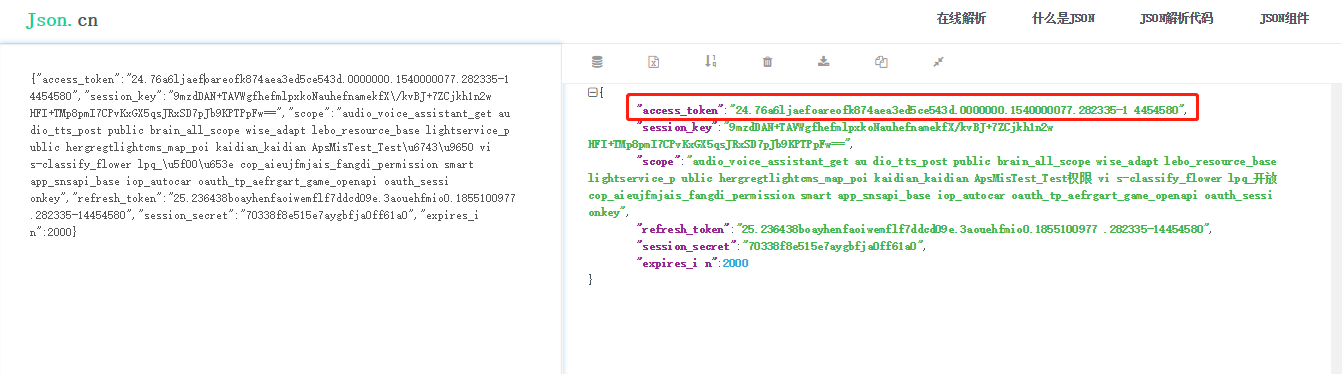
这几个参数并填入下方网址,在网页中打开,获取“access_token”
- https://openapi.baidu.com/oauth/2.0/token?grant_type=client_credentials&client_id=<API-key>&client_secret=<Secret Key>
在网页中打开,获取“access_token”
- http://tsn.baidu.com/text2audio?tex=你要说的话&lan=zh&vol=10&spd=4&cuid=<Api-key>&ctp=1&tok=<access_token>
如果这个网址能在网页上正确打开并播放语音,则说明以上过程没有出错,如果想在命令行中播放语音还需要m**yer这个插件
- sudo apt-get install m**yer
接下来,我们把他写入脚本
这里图上有点儿错误,文件都是/root/mm.mp3,这段代码总是贴不上,大家看图吧
将以上代码随便起一个名字,放入root文件夹
- chmod 755 /root/yourfilename
赋予执行权限,再根据需要写入定时任务即可,其中
可以搭配其他插件组合使用发挥奇效,比如定时报时,闹钟,报出天气预报,给小孩子念诗,报出N1的ip地址之类的,看大家想象力了
我用来定时播报天气预报的例子
- . /toor/weather.log
- curl "https://free-api.heweather.com/s6/weather/now?location=city&key=<your_key>" > /root/weather.log ;
- #这只是我调用的一个天气接口,大家请忽略
- local=$(jq -r .HeWeather6[0].basic.location /root/weather.log);
- cond=$(jq -r .HeWeather6[0].now.cond_txt /root/weather.log);
- tmp=$(jq -r .HeWeather6[0].now.tmp /root/weather.log);
- wind1=$(jq -r .HeWeather6[0].now.wind_sc /root/weather.log);
- wind2=$(jq -r .HeWeather6[0].now.wind_dir /root/weather.log);
- ttt="此时"$local"天气:"$cond";温度:"$tmp"℃;伴有:"$wind1"级"$wind2 ;
- urlen=$(echo "$ttt" | tr -d '\n' | xxd -**in | sed 's/\(..\)/%\1/g' )
- wget -o- "http://tsn.baidu.com/text2audio?tex=$urlen&lan=zh&vol=10&spd=4&cuid=<你的参数>&ctp=1&tok=<你的参数>" -O /mnt/mm.mp3
- m**yer /mnt/mm.mp3
- rm /mnt/mm.mp3
来源大手:心理有数
更多资讯敬请关注智能电视网
海量精品智能电视专用应用关注当贝市场
http://www.dangbei.com/
|
|

 /2





 雷达卡

 发表于 2018-10-23 14:13



 提升卡
 置顶卡
 变色卡
 千斤顶


