本帖最后由 pppio 于 2025-1-28 04:50 编辑
扫过这款盒子端口的都知道,在[盒子ip]:8383有一个运维工具,进入的用户名和密码都是admin
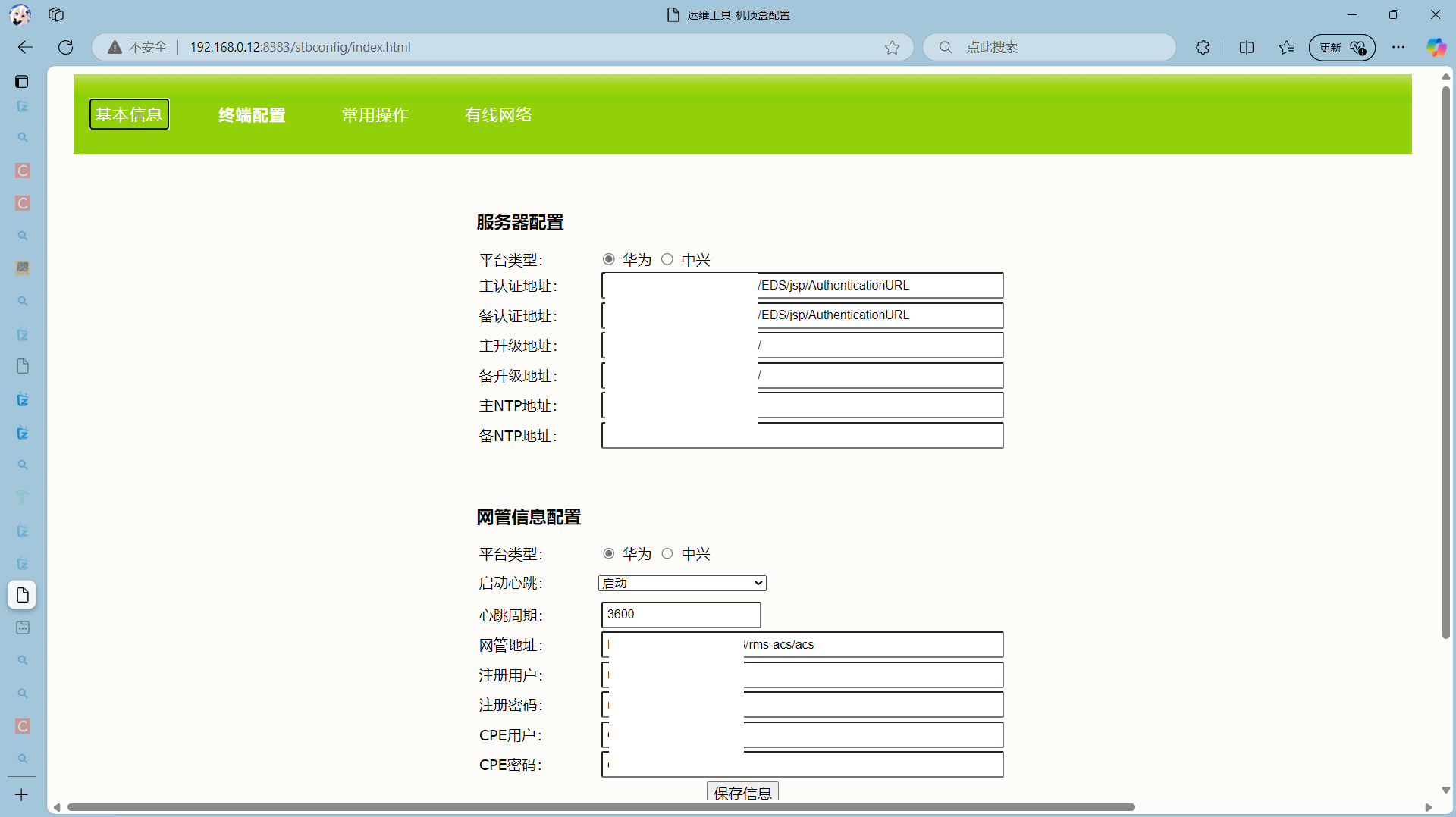
[ip地址]:8383 界面
修改iptv账号密码过程
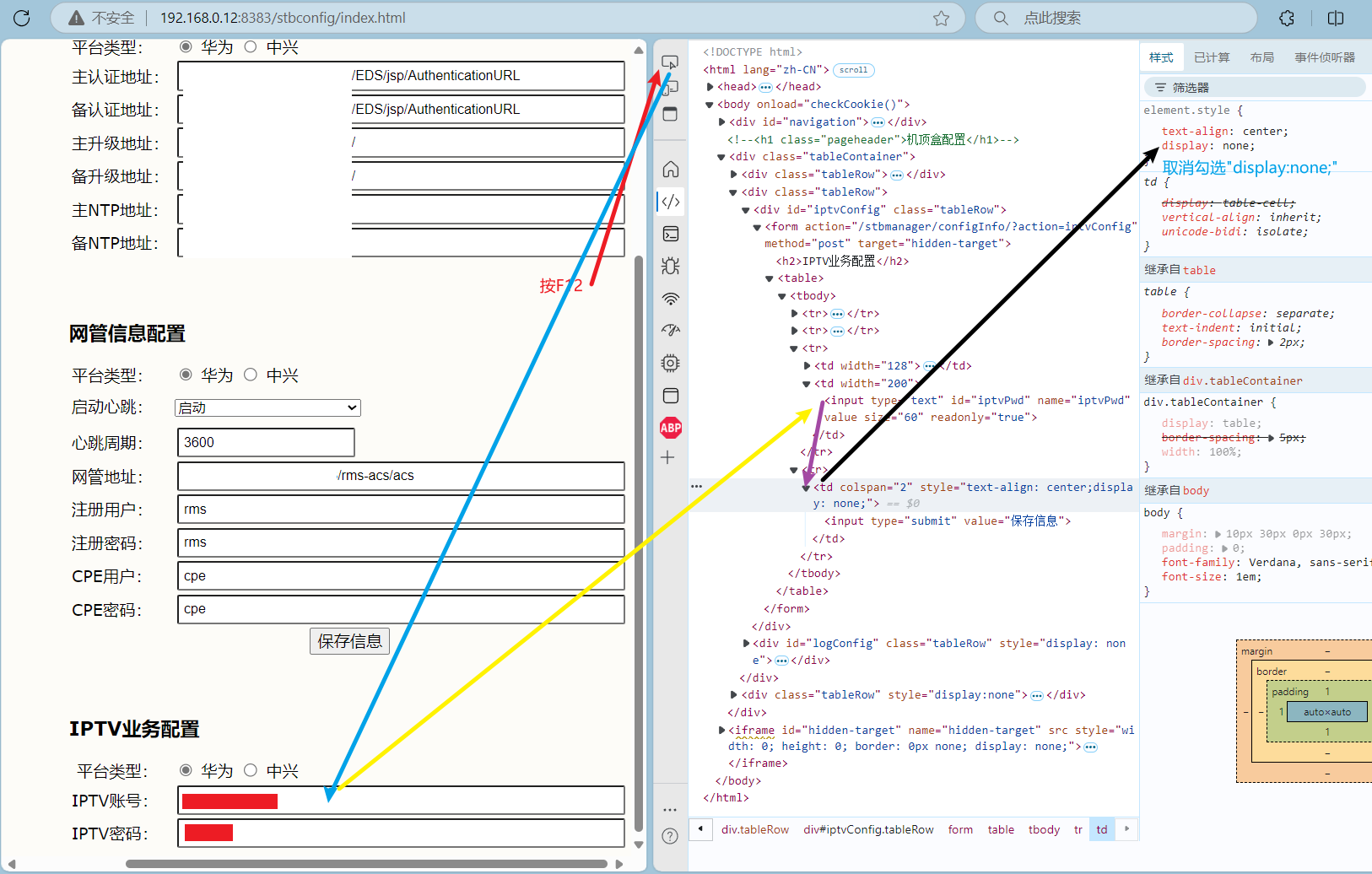
[ip地址]:8383 界面 & 修改iptv账号密码过程
这个界面里,可以修改iptv的账号密码(见图)
ps:图里忘了加了,还需要把账号密码的文本框的readonly="true"去掉
一键显示代码:
在控制台内输入并按回车
- document.getElementById("iptvAccount").removeAttribute("readOnly");
- document.getElementById("iptvPwd").removeAttribute("readOnly");
- document.getElementById("iptvPwd").parentNode.parentNode.parentNode.children[3].children[0].style.display='block'
而这个工具是由盒子的隐藏界面提供的。
盒子隐藏界面-管理后台
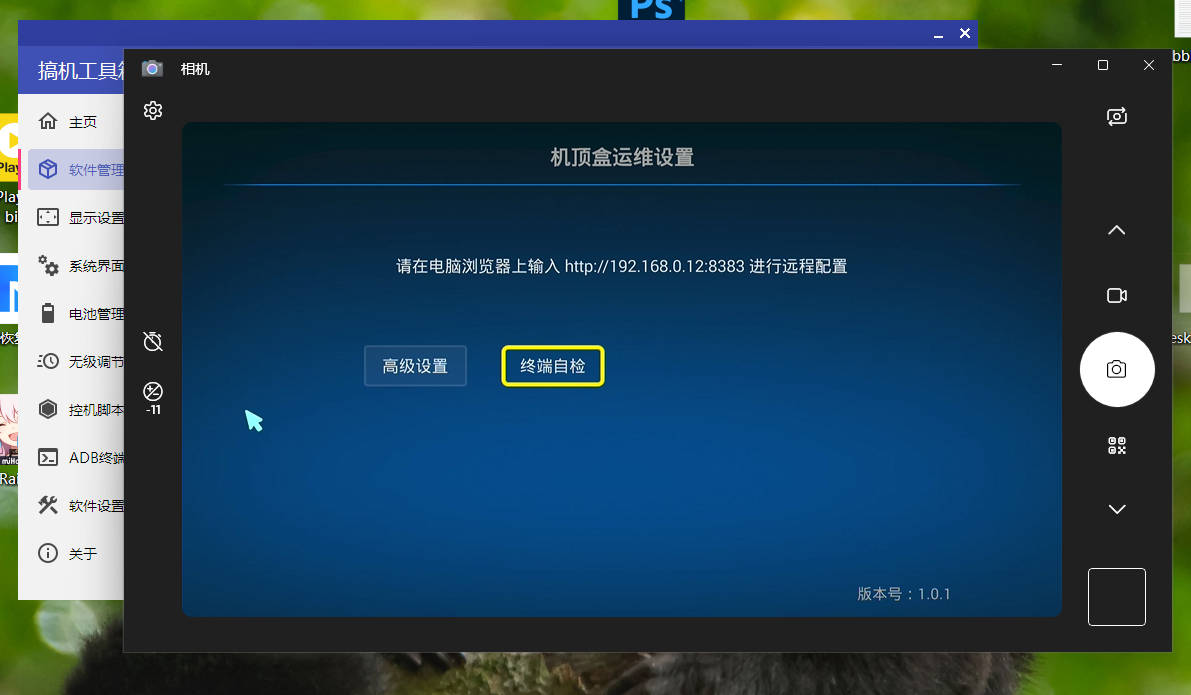
盒子隐藏界面-管理后台
进入隐藏界面的方法:
联网进入IPTV界面,右上角菜单内找到帮助中心-->亮点功能使用说明。选择后无反应黑屏,此时长按确认键进入此界面
盒子隐藏界面-执行shell
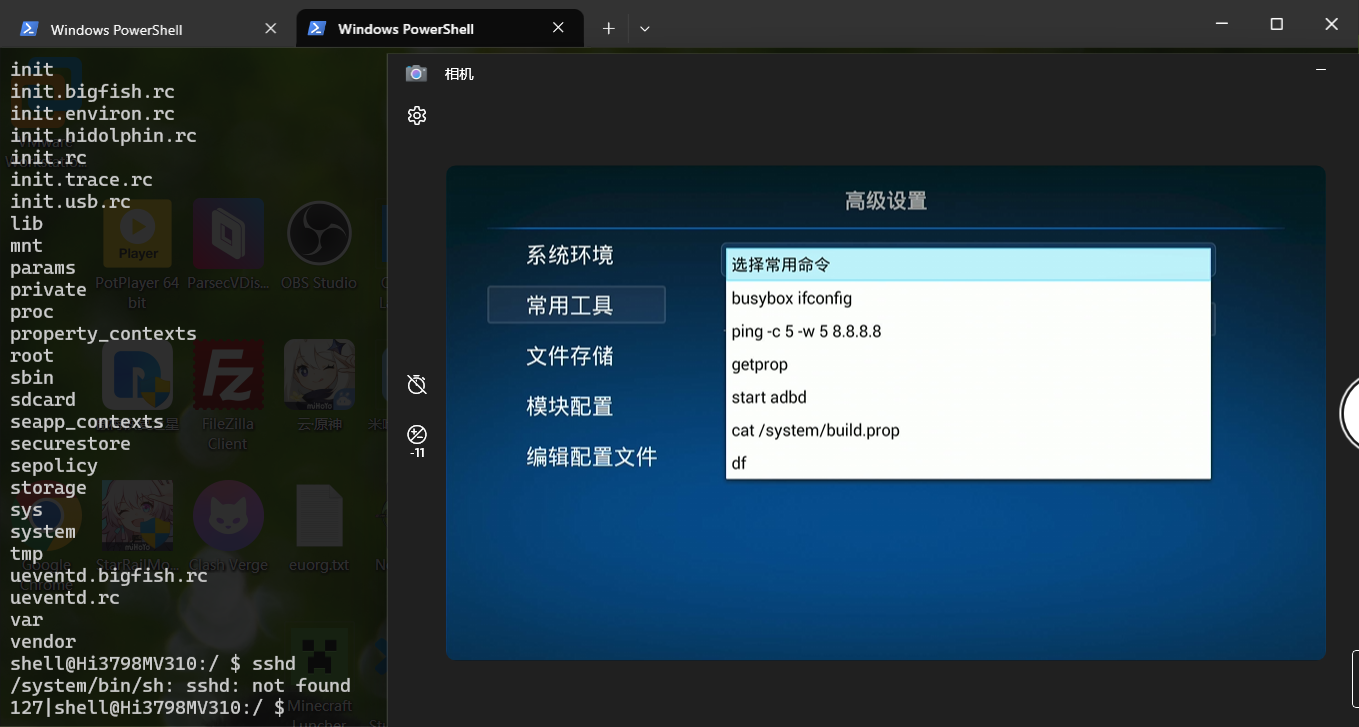
盒子隐藏界面-执行shell
这个界面内执行 start adbd 命令开启adb,开启后在电脑上用adb connect [ip地址]即可连接盒子 望友友们不要大肆传播,被厂家封掉就不好了
一些常用的命令(如whoami)要使用busybox +命令才可以用
busybox信息: - 127|shell@Hi3798MV310:/ $ busybox --help
- BusyBox v1.26.2 (2017-10-12 23:26:27 CST) multi-call binary.
- BusyBox is copyrighted by many authors between 1998-2015.
- Licensed under GPLv2. See source distribution for detAIled
- copyright notices.
- Usage: busybox [function [arguments]...]
- or: busybox --list[-full]
- or: busybox --install [-s] [DIR]
- or: function [arguments]...
- BusyBox is a multi-call binary that combines many common Unix
- utilities into a single executable. Most people will create a
- link to busybox for each function they wish to use and BusyBox
- will act like whatever it was invoked as.
- Currently defined functions:
- [, [[, acpid, addgroup, adduser, adjtimex, ar, arp, arping, ash, awk,base64, basename, beep, blkdiscard, blkid, blockdev, bootchartd, brctl,bunzip2, bzcat, bzip2, cal, cat, catv, chat, chgrp, chmod, chown,chpasswd, chpst, chroot, chrt, chvt, cksum, clear, cmp, comm, conspy,cp, cpio, crond, crontab, cryptpw, cttyhack, cut, date, dc, dd,deallocvt, deLGroup, deluser, depmod, devmem, df, dhcprelay, diff,dirname, dmesg, dnsd, dnsdomainname, dos2unix, du, dumpkmap,dumpleases, echo, ed, egrep, eject, env, envdir, envuidgid, ether-wake,expand, expr, fakeidentd, false, fbset, fbsplash, fdflush, fdformat,fdisk, fgconsole, fgrep, find, findfs, flash_eraseall, flash_lock,flash_unlock, flashcp, flock, fold, free, freeramdisk, fsck.MINIX,fstrim, fsync, ftpd, ftpget, ftpput, fuser, getopt, getty, grep,groups, gunzip, gzip, halt, hd, hdparm, head, hexdump, hostid,hostname, httpd, hush, hwclock, id, ifconfig, ifdown, ifenslave,ifplugd, ifup, inetd, init, inotifyd, insmod, install, ionice, iostat,ip, ipaddr, ipcalc, ipcrm, ipcs, iplink, ipneigh, iproute, iprule,iptunnel, kbd_mode, kill, killall, killall5, klogd, last, less,linux32, linux64, linuxrc, ln, loadfont, loadkmap, logger, login,logname, logread, losetup, lpd, lpq, lpr, ls, lsmod, lsof, lspci,lsusb, lzcat, lzma, lzop, lzopcat, makedevs, makemime, man, md5sum,mesg, microcom, mkdir, mkdosfs, mkfifo, mkfs.minix, mkfs.vfat, mknod,mkpasswd, mkswap, mktemp, modinfo, modprobe, more, mount, mountpoint,mpstat, msh, mt, mv, nameif, nanddump, nandwrite, nbd-client, nc,netstat, nice, nmeter, nohup, nsenter, nslookup, ntpd, od, openvt,passwd, patch, pgrep, pidof, ping, ping6, pipe_progress, pivot_root,pkill,pmap, popmaildir, poweroff, powertop, printenv, printf, ps,pscan, pstree, pwd, pwdx, raidautorun, rdate, rdev, readahead,readlink, readprofile, realpath,reboot, reformime, renice, reset,resize, rev, rm, rmdir, rmmod, route, rpm, rpm2cpio, rtcwake,run-parts, runlevel, runsv, runsvdir, rx, script, scriptreplay, sed,sendmail, seq, setarch, setconsole, setfont, setkeycodes, setlogcons,setserial, setsid, setuidgid, sh, sha1sum, sha256sum, sha3sum,sha512sum, showkey, slattach, sleep, smemcap, softlimit, sort, split,start-stop-daemon, stat, strings, stty, su, sulogin, sum, sv, svc,svlogd, swapoff, swapon, switch_root, sync, sysctl, syslogd, tac, tail,tar, taskset, tcpsvd, tee, test, tftp, tftpd, time, timeout, top,touch, tr, traceroute, traceroute6, true, tty, ttysize, tunctl,ubiattach, ubidetach, ubimkvol, ubirename, ubirmvol, ubirsvol,ubiupdatevol, udhcpc, udhcpd, udpsvd, umount, uname, uncompress,unexpand, uniq, unix2dos, unlzma, unlzop, unshare, unxz, unzip, uptime,users, usleep, uudecode, uuencode, vconfig, vi, vlock, volname, wall,watch, watchdog, wc, wget, which, who, whoami, whois, xargs, xz, xzcat,yes, zcat, zcip
隐藏界面包名:
隐藏界面包名
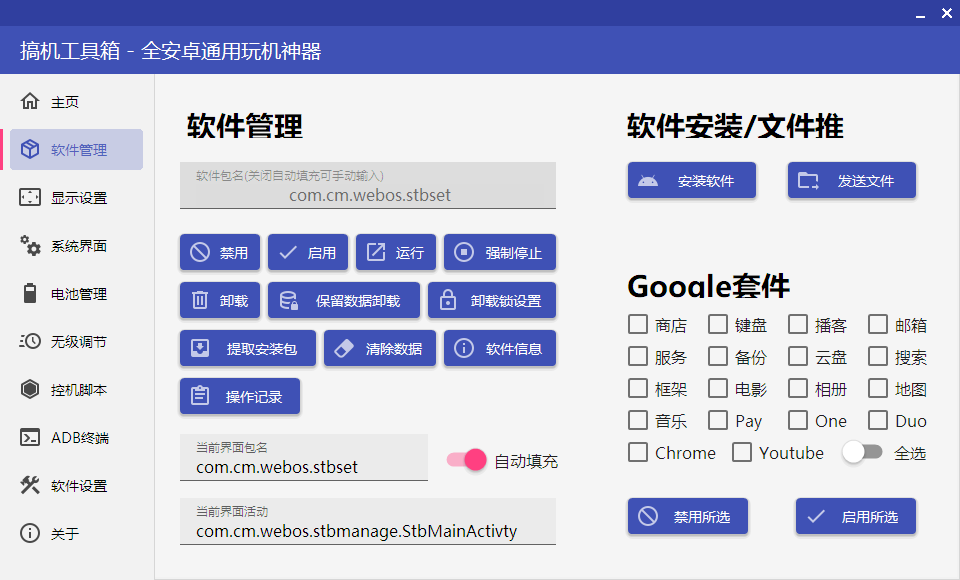
目前还不知道怎样获取root,欢迎大家讨论
|
 /2





 雷达卡

 发表于 2025-1-28 03:39

 提升卡
 置顶卡
 变色卡
 千斤顶