推荐当贝市场

 找回密码
 立即注册

QQ登录

只需一步,快速开始

查看: 173037|回复: 57

[魔百盒] 折腾起来!玩转Armbian 魔百盒M401A刷机包下载

 火.. [复制链接]
发表于 2024-5-23 14:28 | 显示全部楼层 |阅读模式
折腾起来!对于热爱技术折腾的玩家们,现在有了全新的挑战——玩转Armbian系统,让你的魔百盒M401A焕发新生!下面为你提供魔百盒M401A的刷机包下载链接,一起开启你的折腾之旅吧!

【准备工具】

1、USB公对公线、U盘(最好是8G以上)

2、FinalShell、PuTTY、USB_Burning_Tool.v2.1.6.8、开心电视助手、balenaEtcher

3、刷机版安卓9固件

4、armbian固件 https://github.com/ophub/amlogic-s9xxx-armbian

【刷机步骤】

1、制作armbian U盘

a. 将下载的armbian系统镜像用balenaEtcher或USBWriter写入U盘;

b. 打开U盘内的uEnv.txt文件,将

FDT=/dtb/amlogic/meson-g12a-s905l3a-e900v22c.dtb

修改为

FDT=/dtb/amlogic/meson-g12a-s905l3a-m401a.dtb

2、刷机版安卓

  问下卖家是不是全新未刷过机的盒子,未刷机过的盒子,无需拆机。刷过机的有可能线刷无法识别,这种情况可拆机短接或使用晶晨免拆神器。(拆机短接另外找教程,免拆神器pdd有卖,不建议短接,有难度)

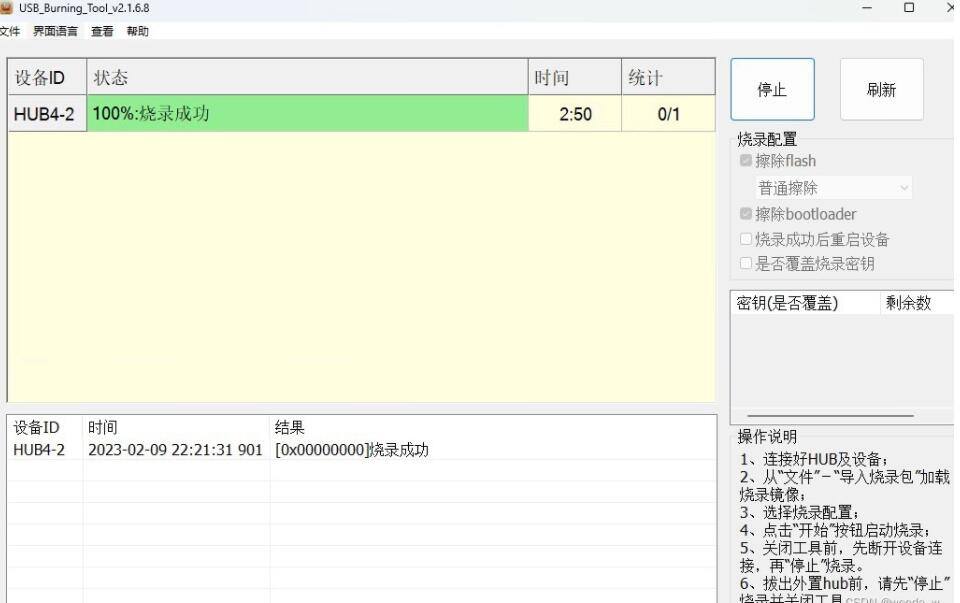
a. 运行刷机工具USB_Burning_Tool--选择左上角的文件按钮--选择导入烧录包--导入“江苏M401A原机官改root线刷超级桌面.img”并等待加载完成;

b. 从盒子底部散热孔找到重置键,按住重置键,USB双公头线一端连电脑,一端连盒子靠近网口的USB口,此时有电脑有“滴”的一声连接音,同时刷机工具“USA_Burning”显示““已连接”,表示刷机工具已识别盒子。松开重置键,再插上盒子电源线供电,刷机工具选项保持默认,点击开始按钮进行刷机。(另一种方法:先点开始按钮,再按住重置键并插USB双公头线和电源线,自动开始刷机后松开重置键);

QQ截图20240523141300.jpg

c. 显示刷机完成后,先点击停止并关闭刷机软件,再断开盒子电源,重新开机。此时刷机完成可作为网络电视盒使用。

d..用网线连接自己路由器和盒子,电脑进入路由器管理界面查看盒子的IP地址。

3、刷armbian

a. 打开开心电视助手,设备IP地址填盒子IP,端口填5555,点击连接;从助手界面可以看到盒子的系统现在是安卓的界面了。

b. 将U盘插入靠近网口的USB口。点击开心电视助手--调试--晶晨芯片--从U盘/SD卡启动,盒子开始重启(U盘启动失败也可尝试先点击U盘启动盒子亮红灯时再插入U盘,我这里失败了好多次,然后把安卓包换成TVRbox的包才成功,刷TVrbox的步骤就是重复第二步骤的刷机步骤,不需要免拆神器和短接,连接到USB_Burnning就可以刷,记得把烧录的包换成TVrbox的包就行);

c. 刷新路由器管理界面,从后台看U盘armbian的IP地址(和上个IP不同连接开心电视助手的IP是不一样的);

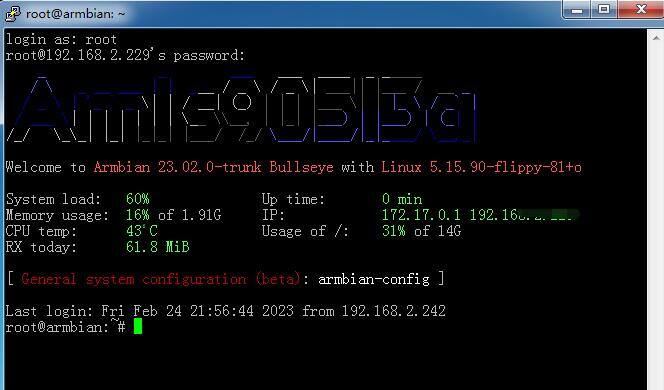
d. 电脑打开PUTTY,主机名称填U盘的IP地址,连接类型“SSH”(一般是默认的),点击打开;

e. armbian默认用户名root,密码1234,登录后会提示修改密码(可按2次回车跳过,或者修改自己的密码,输入密码不会显示,直接回车,输入第二次再回车就是自己的密码了);改完密码后,按1选择bash,出现创建新用户时按Ctrl+C打断;

QQ截图20240523141307.jpg

f. 写入emmc(可选)。写入emmc可以认为是把盒子的系统刷成armbian,不写入的话就只有在盒子插U盘才是armbian系统才能刷docker。输命令

armbian-install
按提示选择m401a.dtb,文件系统选ext4;提示写入成功后,输命令reboot重启。重启完后关电源拔U盘,再次启动,刷机完成。

4、装docker

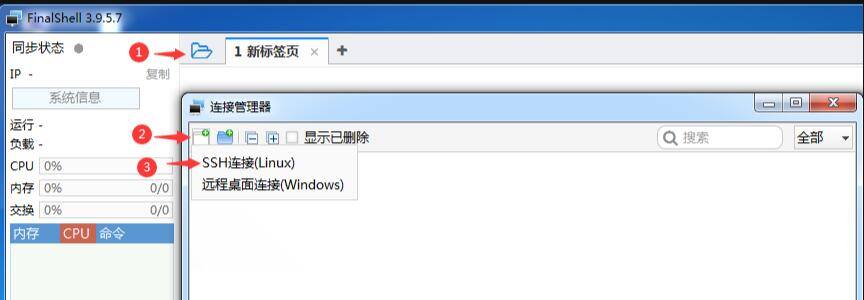
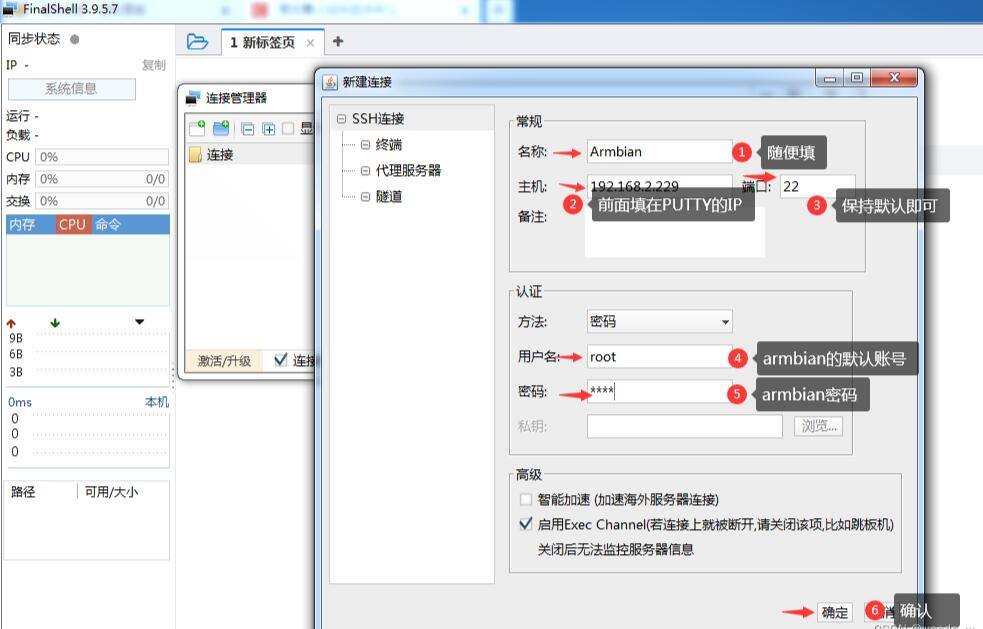
a. 换用FinalShell连接盒子:

QQ截图20240523141319.jpg

QQ截图20240523141327.jpg

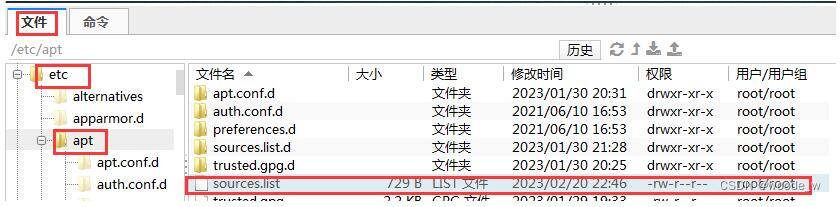
b. 进入FinalShell,下面窗口选择:文件:etc/apt/sources.list,双击打开,删除或注释掉里面的内容,再从以下源中选择任意一个源添加,Ctrl+S保存:

QQ截图20240523141336.jpg

阿里源

deb https://mirrors.aliyun.com/debian/ bullseye mAIn non-free contrib
#deb-src https://mirrors.aliyun.com/debian/ bullseye main non-free contrib
deb https://mirrors.aliyun.com/debian-security/ bullseye-security main
#deb-src https://mirrors.aliyun.com/debian-security/ bullseye-security main
deb https://mirrors.aliyun.com/debian/ bullseye-updates main non-free contrib
#deb-src https://mirrors.aliyun.com/debian/ bullseye-updates main non-free contrib
deb https://mirrors.aliyun.com/debian/ bullseye-backports main non-free contrib
#deb-src https://mirrors.aliyun.com/debian/ bullseye-backports main non-free contrib
清华源

deb https://mirrors.tuna.tsinghua.edu.cn/debian/ bullseye main contrib non-free
#deb-src https://mirrors.tuna.tsinghua.edu.cn/debian/ bullseye main contrib non-free
deb https://mirrors.tuna.tsinghua.edu.cn/debian/ bullseye-updates main contrib non-free
#deb-src https://mirrors.tuna.tsinghua.edu.cn/debian/ bullseye-updates main contrib non-free
deb https://mirrors.tuna.tsinghua.edu.cn/debian/ bullseye-backports main contrib non-free
#deb-src https://mirrors.tuna.tsinghua.edu.cn/debian/ bullseye-backports main contrib non-free
deb https://mirrors.tuna.tsinghua.edu.cn/debian-security bullseye-security main contrib non-free
#deb-src https://mirrors.tuna.tsinghua.edu.cn/debian-security bullseye-security main contrib non-free
中科大源

deb https://mirrors.aliyun.com/debian/ bullseye main non-free contrib
#deb-src https://mirrors.aliyun.com/debian/ bullseye main non-free contrib
deb https://mirrors.aliyun.com/debian-security/ bullseye-security main
#deb-src https://mirrors.aliyun.com/debian-security/ bullseye-security main
deb https://mirrors.aliyun.com/debian/ bullseye-updates main non-free contrib
#deb-src https://mirrors.aliyun.com/debian/ bullseye-updates main non-free contrib
deb https://mirrors.aliyun.com/debian/ bullseye-backports main non-free contrib
#deb-src https://mirrors.aliyun.com/debian/ bullseye-backports main non-free contrib

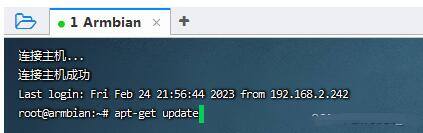
c. 更新。输下面命令回车,等代码跑完

apt-get update

QQ截图20240523141545.jpg


再输下面命令更新

apt-get upgrade

d. 装docker
输命令,下面两任选一个命令,等代码跑完,代表docker安装完毕。

curl -fsSL https://get.docker.com | bash -s docker --mirror Aliyun

apt install docker.io

下面是提到的要用到的工具,自取。

https://www.123pan.com/s/OQ9bVv-3IHod.html
提取码:  yyds


相关阅读:
S905L3b盒子刷armbian Uboot tftpboot 救砖刷机教程
海思hi3798芯片盒子刷乌班图系统做家用NAS教程
S905L-P211盒子秒变神器!Android TV+EmuELEC 4.4/4.5刷入教程大揭秘
2024电视盒子有必要买吗 2024年8K电视盒子哪个最好用
魔百盒M401A拆机 S905L3A芯片盒子刷EmuELEC和Armbian
发表于 2024-5-23 14:29 | 显示全部楼层
sunwukong1 发表于 2024-5-23 14:28
江苏版M401A刷过很多包都卡在开机界面进不去要怎么操作

江苏版M401A刷过很多包都卡在开机界面进不去要怎么操作
回复 顶一个 1 踩 0

使用道具 举报

发表于 2024-5-23 14:28 | 显示全部楼层
江苏版M401A刷过很多包都卡在开机界面进不去要怎么操作
回复 顶一个 踩

使用道具 举报

发表于 2024-5-23 14:29 | 显示全部楼层
麟岛探幽 发表于 2024-5-23 14:29
江苏版M401A刷过很多包都卡在开机界面进不去要怎么操作

换个包 我也是换第二个包才刷好
回复 顶一个 踩

使用道具 举报

发表于 2024-6-18 19:11 | 显示全部楼层
tvrbox的包能找的到的嘛
回复 顶一个 踩

使用道具 举报

发表于 2024-6-20 13:11 | 显示全部楼层
99999999
回复 顶一个 踩

使用道具 举报

发表于 2024-6-21 21:38 来自ZNDS手机版 | 显示全部楼层
666
回复 顶一个 踩

使用道具 举报

发表于 2024-6-22 14:49 | 显示全部楼层
666666666666666
回复 顶一个 踩

使用道具 举报

发表于 2024-6-25 16:12 | 显示全部楼层
谢谢分享  谢谢
回复 顶一个 踩

使用道具 举报

发表于 2024-7-15 22:56 | 显示全部楼层
1111111111
回复 顶一个 踩

使用道具 举报

您需要登录后才可以回帖 登录 | 立即注册

本版积分规则

关闭

站长推荐上一条 /2 下一条

Archiver|小黑屋|新帖|标签|软件|Sitemap|ZNDS智能电视网 ( 苏ICP备2023012627号 )

GMT+8, 2026-11-21 09:34 , Processed in 0.036134 second(s), 11 queries , Redis On.

Powered by Discuz! X3.5

© 2001-2026 Discuz! Team.

快速回复 返回顶部 返回列表