推荐当贝市场

 找回密码
 立即注册

QQ登录

只需一步,快速开始

查看: 76290|回复: 3

[交流讨论] 中兴B860A 后不能安装应用 求解!!!

[复制链接]
发表于 2018-11-23 14:55 | 显示全部楼层 |阅读模式
有这个方法 :
C:\Users\mayn>cd c:/adb

c:\adb>adb connect 192.168.0.101(不要以我的为准,输入自己盒子的IP)
* daemon not running. starting it now on port 5037 *
* daemon started successfully *
connected to 192.168.0.101:5555

adb shell

1|shell@square:/ $ setprop config.Android.AppInstallCtrl 3
setprop config.Android.AppInstallCtrl 3


255|shell@square:/ $ su
su
shell@square:/ # mount -o remount -o rw /system
mount -o remount -o rw /system
shell@square:/ # echo "setprop config.Android.AppInstallCtrl 3" >> /system/bin/init.zte.post_boot.sh
pInstallCtrl 3" >> /system/bin/init.zte.post_boot.sh                          <
shell@square:/ # echo "start adbd" >> /system/bin/init.zte.post_boot.sh
echo "start adbd" >> /system/bin/init.zte.post_boot.sh
shell@square:/ # echo "adbd&" >> /system/bin/init.zte.post_boot.sh
echo "start adbd" >> /system/bin/init.zte.post_boot.sh


1|shell@square:/ # df
df
Filesystem               Size     Used     Free   Blksize
/dev                   495.0M   128.0K   494.9M   4096
/sys/fs/cgroup         495.0M     0.0K   495.0M   4096
/mnt/asec              495.0M     0.0K   495.0M   4096
/mnt/obb               495.0M     0.0K   495.0M   4096
/tmp                   495.0M   792.0K   494.2M   4096
/var                   495.0M   468.0K   494.5M   4096
/system                991.9M   482.1M   509.8M   4096
/cache                 743.9M   336.1M   407.8M   4096
/data                    5.0G   198.3M     4.8G   4096
/data/var              495.0M     0.0K   495.0M   4096
/mnt/shell/emulated      5.0G   198.3M     4.8G   4096
/mnt/media_rw/sda       10.0M     0.0K    10.0M   4096
/storage/sda            10.0M     0.0K    10.0M   4096
/mnt/media_rw/sda/part1     7.5G     3.4G     4.0G   32768
/storage/sda/part1       7.5G     3.4G     4.0G   32768
(U盘路径判断方法:一般在输入df后最后一行,然后看内存的大小是否差不多即可,可以看到这个7.5G就是我的U盘,路径为前面的“/storage/sda/part1”)
shell@square:/ # cd /storage/sda/part1(注意,不同的型号U盘路径不同,以自己的路径为准)
cd /storage/sda/part1
shell@square:/storage/sda/part1 # cd app
cd app
shell@square:/storage/sda/part1/app # ls
ls
1.apk
2.apk
3.apk

shell@square:/storage/sda/part1/app # cp *.apk /data/app
cp *.apk /data/app
shell@square:/storage/sda/part1/app # am start com.dangbei.tvlauncher
am start com.dangbei.tvlauncher
Starting: Intent { act=android.intent.action.MAIN cat=[android.intent.category.LAUNCHER] pkg=com.dangbei.tvlauncher }
shell@square:/storage/sda/part1/app #(对不起发不了链接)
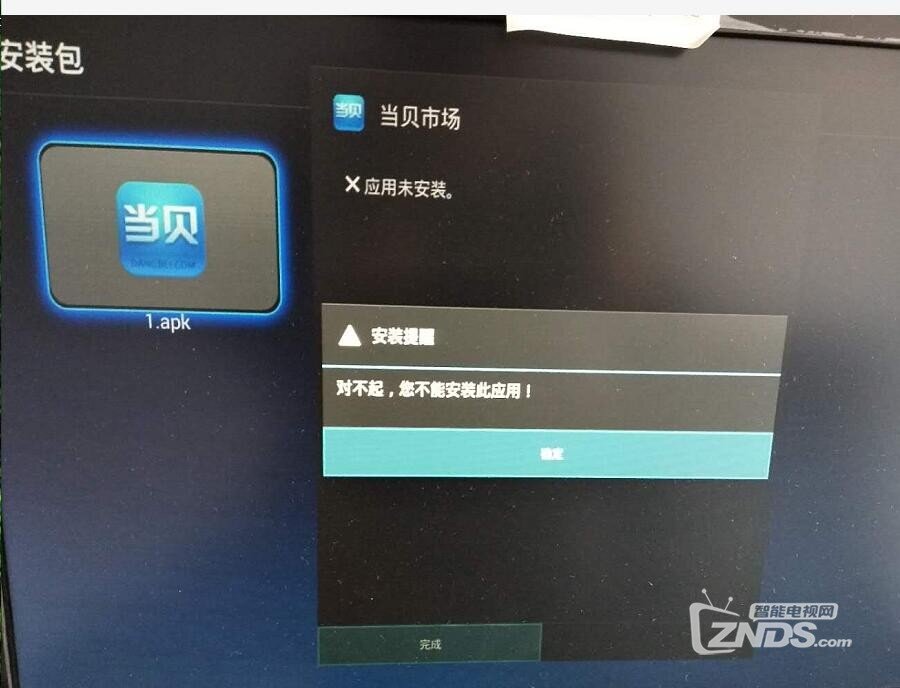
安装应用就报错,如下:
,,还有个问题就是,,破解 后不能关机,重启后机子又进入ITV 界面了。请各位大神指点哈,,,感谢  !!盒子是四川电信。


报错

报错
发表于 2018-11-23 15:10 | 显示全部楼层
回复 顶一个 踩

使用道具 举报

 楼主| 发表于 2018-11-23 16:35 | 显示全部楼层
彼此的羁绊 发表于 2018-11-23 15:10
https://www.znds.com/tv-620601-1-1.html 参考下

请问TTL 跑码后有详细的的操作步骤嘛??
回复 顶一个 踩

使用道具 举报

发表于 2020-2-16 13:13 | 显示全部楼层
我的也是四川电信,TTL设置也不行,只有按第2种方法改配置成功。
回复 顶一个 踩

使用道具 举报

您需要登录后才可以回帖 登录 | 立即注册

本版积分规则

关闭

站长推荐上一条 /2 下一条

Archiver|小黑屋|新帖|标签|软件|Sitemap|ZNDS智能电视网 ( 苏ICP备2023012627号 )

GMT+8, 2026-11-14 18:19 , Processed in 0.025267 second(s), 8 queries , Redis On.

Powered by Discuz! X3.5

© 2001-2026 Discuz! Team.

快速回复 返回顶部 返回列表